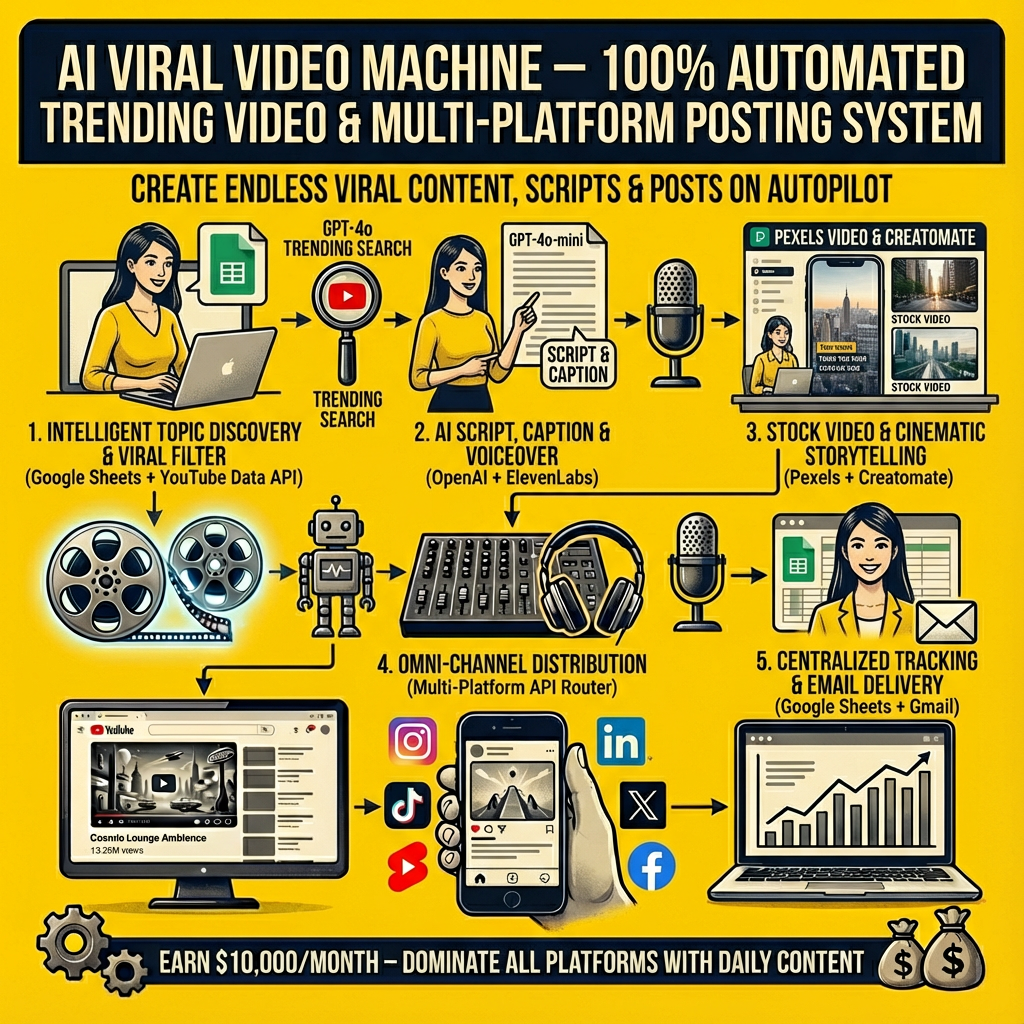
The AI Viral Video Machine is a complete end-to-end automation system that finds trending YouTube content in your niche, extracts the winning ideas, rewrites them into viral scripts, generates AI voiceover + video, and auto-posts across multiple platforms — all from a single Google Sheet input.
This template is designed for creators, agencies, solopreneurs, and brands that want daily viral-style content without spending hours on research, scripting, editing, and posting.
1. Intelligent Topic Discovery (No More Guessing)
The system begins in Google Sheets:
-
Reads your niche or theme from a “Theme” sheet (e.g., “AI automation for business”, “fitness for busy dads”).
-
Looks at the “Search” sheet to see which topics/search terms you’ve already used, so it doesn’t repeat content.
-
Uses OpenAI GPT-4o to generate a fresh YouTube search term your audience would actually type, while avoiding duplicates and varying the term length between 3–5 words for natural search behavior.
Every run = a new, unique angle inside your niche.
2. Viral Filter Using YouTube Data (View vs. Subscriber Logic)
Next, the system queries the YouTube Data API:
-
Searches for videos matching the new search term and pulls the top results sorted by view count.
-
For each candidate video, it fetches:
-
Video statistics (views, etc.)
-
Channel statistics (subscriber count)
-
A built-in “Trending Video Filter” then compares:
video view countvs.channel subscriber count
Only videos where views are greater than subscribers pass—this means the system is selecting content that’s over-performing for that channel, a strong signal of viral potential.
3. Transcript Extraction & Key Idea Summarization
For the winning video:
-
The automation calls a YouTube transcript API via RapidAPI to fetch a detailed transcript.
-
OpenAI GPT-4o-mini then:
-
Summarizes the video in ~150 words
-
Highlights the most important quotes
-
Extracts the core lessons into a clear bullet list
-
This gives you a distilled “idea core” from proven viral content.
All of this is logged into a “Topic” sheet for tracking and reuse.
4. Viral Instagram Reel Script + Caption Generation
Using the summary and original video title, the system generates:
-
A viral reel script
-
Uses GPT-4o to imitate a proven high-converting script structure (hook + numbered steps + CTA).
-
Ensures sentence count and structure match the example script.
-
Formats it with “/” before every sentence so it can be split into lines automatically for overlays and voiceover.
-
-
A viral caption for Instagram
-
Mimics a proven caption pattern:
-
Strong comment CTA
-
Simple explanation of the benefit
-
Save/Share CTA
-
Hashtag block
-
-
Automatically tuned to the specific topic and video title.
-
Both the script and caption are saved into a “Video” sheet for full content tracking.
5. AI Voiceover Creation with ElevenLabs
To avoid manual recording, the system:
-
Splits the reel script into sentences using the “/” separators.
-
Takes the first 5 key lines and sends them to ElevenLabs using a multilingual, high-quality voice model.
-
ElevenLabs returns a natural, human-like voiceover file (audio).
This audio is then:
-
Uploaded to Google Drive
-
Given a public share link so it can be used in the final video render.
6. Stock Video & Cinematic Storytelling via Pexels + Creatomate
To create scroll-stopping visuals:
-
The automation calls the Pexels Videos API using your niche as the search query (from the “Theme” sheet).
-
Randomly selects one video from the results for variation (using a shuffle + first selection logic).
Then, it sends everything to Creatomate:
-
Template ID (your pre-built story/reel template)
-
Modifications:
-
Audio: Google Drive share link of the ElevenLabs voiceover
-
Video: Pexels stock video URL
-
Text-1 → Text-5: The first five sentences of your script as on-screen captions
-
Creatomate then renders a complete vertical video:
-
AI voiceover
-
Dynamic text overlays
-
Stock B-roll background
No editing software is ever opened.
7. Multi-Platform Distribution (Omni-Channel Posting)
Once the video is ready, the automation fan-distributes it across multiple channels via a router:
-
LinkedIn – Uploads as a native video post with your generated caption.
-
X (Twitter) – Uploads media and posts a tweet using one of the key transcript lines as the text.
-
Instagram Reels – Publishes a reel to your business account using the Creatomate video URL and AI caption.
-
YouTube – Uploads as a video with:
-
Title from the first transcript sentence
-
Description from the AI caption
-
Category and visibility preconfigured.
-
-
Facebook Page – Uploads the video file directly with your caption.
-
Email Delivery for TikTok – Sends you an email via Gmail with:
-
The video file attached
-
The caption text in the body (so you can paste it into TikTok).
-
All of this happens in one automated roundtrip.
8. Centralized Tracking in Google Sheets
Throughout the workflow, the system keeps your Google Sheets updated:
-
“Search” sheet – Every new YouTube search term used.
-
“Topic” sheet – Video ideas, summaries, key lessons.
-
“Video” sheet – Scripts, captions, video status, and metadata.
This turns your Google Sheets into a content operations dashboard for your viral clips.
Tools Used in This Automation
Based on the JSON flow:
-
Make (Scenario Orchestration)
-
Google Sheets
-
Get cell (Theme)
-
Filter rows (Search)
-
Add row (Search, Topic, Video)
-
Update row (Video)
-
-
OpenAI (via Make’s OpenAI module)
-
GPT-4o for search term generation, reel script, and caption
-
GPT-4o-mini for YouTube summary and key lessons
-
-
HTTP / API Modules
-
YouTube Data API (search, videos statistics, channels statistics)
-
RapidAPI – YouTube Transcript / Summarizer endpoint
-
Pexels Videos API
-
HTTP Get File for downloading final videos
-
-
JSON Parse & Utility Modules
-
JSON:ParseJSON for API responses
-
BasicFeeder for looping items
-
TextAggregator for joining existing search terms
-
SetVariable for “Transcript sentences” and “Random Video”
-
-
ElevenLabs – Text-to-Speech (voiceover)
-
Google Drive – Upload audio, generate shareable links
-
Creatomate – RenderTemplate for final video creation
-
LinkedIn API – CreateVideoPost
-
Twitter / X API – Upload media + Create Tweet
-
Instagram Business API – Create Reels
-
YouTube API – Upload Video
-
Facebook Pages API – Upload Video
-
Gmail (Google Email) – Send email with video attached
Ideal For
-
Content creators who want daily viral-style short videos
-
Coaches, consultants, and info businesses building authority
-
Agencies delivering content packages to clients
-
Faceless brand channels across YouTube Shorts, IG Reels, TikTok
-
Anyone who wants one system that handles ideation, scripting, voiceover, video creation, and posting
This is not a “preset filter” or one simple automation.
It’s a full viral video production and distribution pipeline that runs on autopilot from a single Google Sheet.